

You can share any StickyAlbum directly from the open Album by clicking the built-in Share Icon.
The Icon located on the right side of the StickyAlbum. It will look like the image below.
To share click on the icon, and you can share the link directly to Facebook, Twitter, Pinterest, email and text (text option only shows on mobile devices).

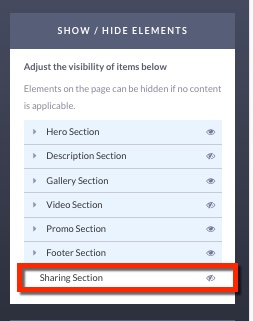
If you do not see the sharing icon in your StickyAlbum it will need to be turned on in the Hide/Show Panel. If the eyeball is turned off then the sharing feature will not show in your Folio. To see this in your Folio make sure to turn the eyebll icon to on.
Note: If you have not configured your browser to open email links, the email icon may not open your email program.