If you use Drip for email management, you can automatically send leads captured by a StickyFolios Button to a Drip email list by embedding a Drip contact form.
If you need to set up a Drip account, click this link to get started: Create A Drip Account
Finding your Contact form in Drip:
Log in to your Drip account.
Select Forms at the top of the page.
Select Settings next to the form you would like to use.

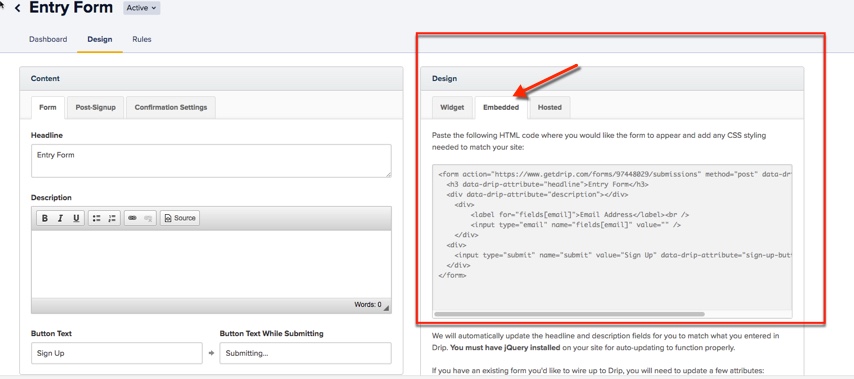
Click Embedded under Design on the right side of the page. Copy the embed code.
To add your Drip embed code to the StickyFolios Builder:
Step 2 - Paste the code into a button
1. Select your Button
Click the Button to edit
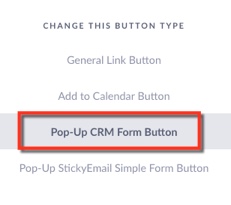
Change the button Type - to Pop-Up CRM Form Button
2. Enter Data
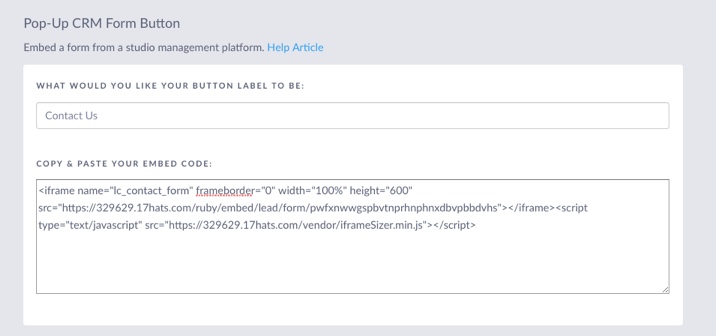
Enter the Button Label. This text will display on the Button in your Folio
Paste your embed code into the Copy and Paste Your Embed Code Box
3. Click the green Save & Close button to save the changes