

Your existing site, will stay with GoDaddy, but just not be visible once you point things over to Sticky.
Here are the directions. There are three parts.
1. Editing the A Record with GoDaddy (directions below).
2. Adding the domain to StickyFolios (click here for information on adding to the System).
3. Using the domain with Sticky (adding a domain to a Folio).
The first two have to happen the first time you set up a domain. The last one through the use of Paths can happen each time you make a Folio.
1. Edit your A record to point to our IP 52.41.106.131 - Directions below for how to do this with GoDaddy
Log in to your GoDaddy account and open your product. (Need help opening your product?)
From the Domain Manager, select your domain name from the list to access the Domain Settings page.
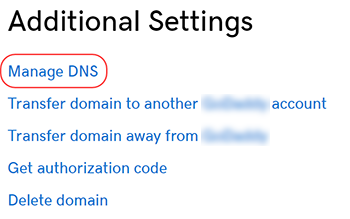
Scroll down to the Additional Settings section and select Manage DNS.
On the DNS Management page, next to the record you wish to edit, click the pencil icon.

Edit Points to field to be: 52.41.106.131
Click Save when finished.