

The settings section is where you can update features and elements that impact your Folio. To learn what each section does click on the links below.
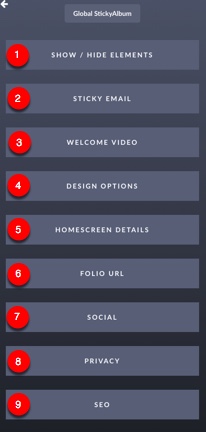
1. Hide Show Elements - This allows you to hide and show elements within your Folio.
2. StickyEmail - If you have a StickyEmail membership this is where you can add sequence sign-up forms to your Folio.
3. Welcome Video - Add a floating video to welcom visitors to your Folio.
4. Design Options - Customize Typeface (Font) and Button Colors
5. Homescreen Details - Add App Name and turn on optional prompt to add to home screen or caching (StickyAbums only)
6. Folio URL - Customize your Folio domain in this section
7. Social - This area allows you to set the image and text when the Folio is shared on Social Media.
8. Privacy - In this section you can add a passcode or hide your Folio from search engines.
9. SEO - Add Tracking codes, Site Title/Description along with make sure you are optiomizing SEO for your Folios.